取得 ADK 工具的操作確認
某些 agent 工作流程需要進行決策、驗證、安全性或一般監督時的確認。在這些情境下,你會希望在繼續執行工作流程之前,先從人類或監督系統取得回應。Agent Development Kit (ADK) 的 工具確認(Tool Confirmation)功能,允許 ADK 工具在執行時暫停,並與使用者或其他系統互動,以取得確認或在繼續前收集結構化資料。你可以透過以下方式,將工具確認功能應用於 ADK 工具:
- 布林值確認: 你可以在 FunctionTool 中設定
require_confirmation參數。這個選項會讓工具暫停,等待使用者回覆「是」或「否」的確認。 - 進階確認: 若情境需要回傳結構化資料,你可以設定
FunctionTool,並提供文字提示來說明確認內容及預期回應。
您可以設定如何將請求傳達給使用者,系統也可以透過 Agent Development Kit (ADK) 伺服器的 REST API 使用遠端回應。當您在 ADK 網頁 UI 搭配確認功能時,agent 工作流程會顯示一個對話框,向使用者請求輸入,如下圖所示:
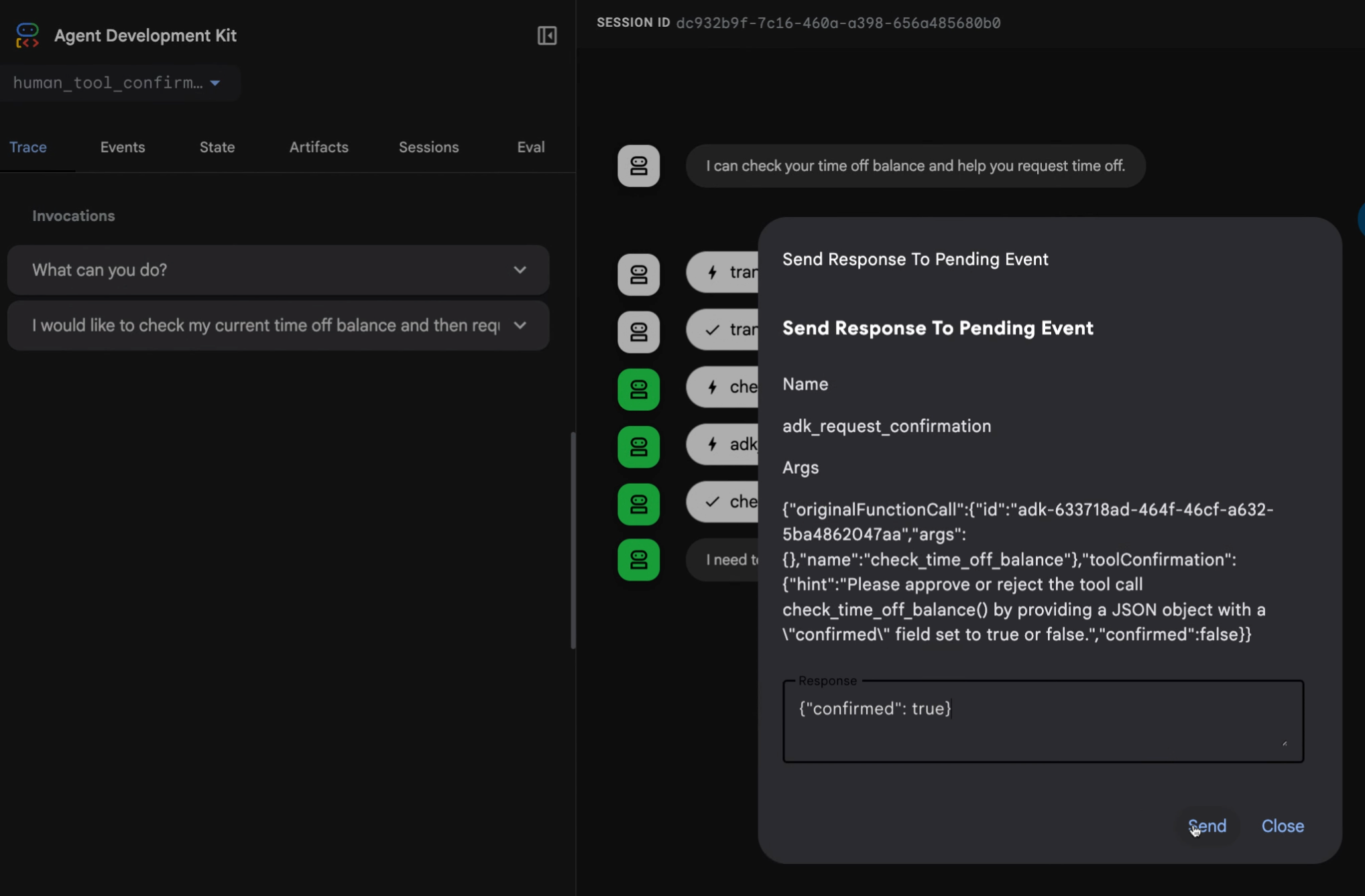
圖 1. 使用進階工具回應實作的範例確認回應請求對話框。
以下章節將說明如何在不同確認情境下使用此功能。完整範例程式碼請參考 human_tool_confirmation 範例。若需將人工輸入納入 agent 工作流程的其他方式,請參閱 Human-in-the-loop agent 模式。
布林值確認
當您的工具僅需使用者簡單地回覆 yes 或 no 時,您可以使用 FunctionTool 類別作為包裝器,為工具新增確認步驟。例如,若您有一個名為 reimburse 的工具,可以透過將其包裝在 FunctionTool 類別中,並將 require_confirmation 參數設為 True 來啟用確認步驟,如下例所示:
# From agent.py
root_agent = Agent(
   ...
   tools=[
        # Set require_confirmation to True to require user confirmation
        # for the tool call.
        FunctionTool(reimburse, require_confirmation=True),
    ],
...
這種實作方法所需的程式碼最少,但僅限於用戶或確認系統進行簡單的核准。若需此方法的完整範例,請參考 human_tool_confirmation 範例程式碼。
require_confirmation 函式
你可以透過將 require_confirmation 的輸入值替換為一個回傳布林值的函式,來修改其行為。以下範例展示了一個用於判斷是否需要確認的函式:
async def confirmation_threshold(
    amount: int, tool_context: ToolContext
) -> bool:
  """Returns true if the amount is greater than 1000."""
  return amount > 1000
此函式接著可以設為 require_confirmation 參數的值:
root_agent = Agent(
   ...
   tools=[
        # Set require_confirmation to True to require user confirmation
        FunctionTool(reimburse, require_confirmation=confirmation_threshold),
    ],
...
如需此實作的完整範例,請參閱 human_tool_confirmation 範例程式碼。
進階確認
當工具確認(tool confirmation)需要向使用者提供更多細節或更複雜的回應時,請使用 tool_confirmation 實作方式。這種做法會擴充ToolContext 物件,為使用者新增請求的文字描述,並允許更複雜的回應資料。在這種實作方式下,你可以暫停工具的執行、請求特定資訊,然後在取得資料後繼續執行工具。
這個確認流程包含一個請求階段,系統會組合並傳送輸入請求給人類回應,以及一個回應階段,系統會接收並處理回傳的資料。
確認定義
當你要建立具有進階確認功能的工具時,請建立一個包含 ToolContext 物件的函式。然後,使用 tool_confirmation 物件,搭配tool_context.request_confirmation() 方法與hint 和payload 參數來定義確認。這些屬性的用途如下:
hint:描述性訊息,說明需要使用者提供什麼資訊。payload:你預期回傳的資料結構。此資料型別為 Any,且必須可序列化為 JSON 格式字串,例如 dictionary 或 pydantic model。
以下程式碼展示了一個處理員工請假申請的工具之實作範例:
def request_time_off(days: int, tool_context: ToolContext):
  """Request day off for the employee."""
  ...
  tool_confirmation = tool_context.tool_confirmation
  if not tool_confirmation:
    tool_context.request_confirmation(
        hint=(
            'Please approve or reject the tool call request_time_off() by'
            ' responding with a FunctionResponse with an expected'
            ' ToolConfirmation payload.'
        ),
        payload={
            'approved_days': 0,
        },
    )
    # Return intermediate status indicating that the tool is waiting for
    # a confirmation response:
    return {'status': 'Manager approval is required.'}

  approved_days = tool_confirmation.payload['approved_days']
  approved_days = min(approved_days, days)
  if approved_days == 0:
    return {'status': 'The time off request is rejected.', 'approved_days': 0}
  return {
      'status': 'ok',
      'approved_days': approved_days,
  }
完整範例請參考 human_tool_confirmation 範例程式碼。請注意,當 agent 工作流程的工具執行等待確認時,執行流程會暫停。收到確認後,你可以在 tool_confirmation.payload 物件中存取確認回應,然後繼續執行工作流程。
透過 REST API 進行遠端確認
如果沒有可用的使用者介面(UI)來讓人員確認 agent 工作流程,你可以透過命令列介面(Command Line Interface)處理確認,或將其導向其他管道,例如電子郵件或聊天應用程式。為了確認工具呼叫,使用者或呼叫應用程式需要傳送 FunctionResponse 事件,並附上工具確認資料。
你可以將請求發送到 Agent Development Kit (ADK) API 伺服器的 /run 或 /run_sse API 端點,或直接發送給 ADK runner。以下範例使用 curl 指令,將確認資訊傳送到 /run_sse API 端點:
 curl -X POST http://localhost:8000/run_sse \
 -H "Content-Type: application/json" \
 -d '{
    "app_name": "human_tool_confirmation",
    "user_id": "user",
    "session_id": "7828f575-2402-489f-8079-74ea95b6a300",
    "new_message": {
        "parts": [
            {
                "function_response": {
                    "id": "adk-13b84a8c-c95c-4d66-b006-d72b30447e35",
                    "name": "adk_request_confirmation",
                    "response": {
                        "confirmed": true
                    }
                }
            }
        ],
        "role": "user"
    }
}'
REST 型確認(confirmation)回應必須符合以下要求:
id在function_response中應與RequestConfirmationFunctionCall事件中的function_call_id相符。name應為adk_request_confirmation。response物件包含確認狀態以及工具所需的任何其他 payload 資料。
已知限制
工具確認功能有以下限制:
- DatabaseSessionService 不支援此功能。
- VertexAiSessionService 不支援此功能。
下一步
如需有關為 agent 工作流程建構 Agent Development Kit (ADK) 工具的更多資訊,請參閱 Function tools。